Choose a clear starting image
Use a recent, well-lit picture with your face, shoulders and upper body in view. Keep both arms inside the frame if possible. You can start with your arms relaxed; the prepared Bicep Heart scene supplies the movement.
A LITTLE FLEX. A LITTLE LOVE.
One photo. A little flex.
A heart for someone.
Make a Bicep Heart video from a photo of yourself. The pose starts with a raised arm, then your other hand curves against your bicep to form a small heart. Choose your settings, let the movement play out, and download a vertical MP4 to share.
Developer Debug is on. This request uses test credits and a simulated sample. Change mode
Sign in with Google to generate and keep track of your results. Your photo uploads only after you choose Generate.
01 / THE GESTURE
A raised arm. A curved hand. A little heart.
Frames from the original trend reference.
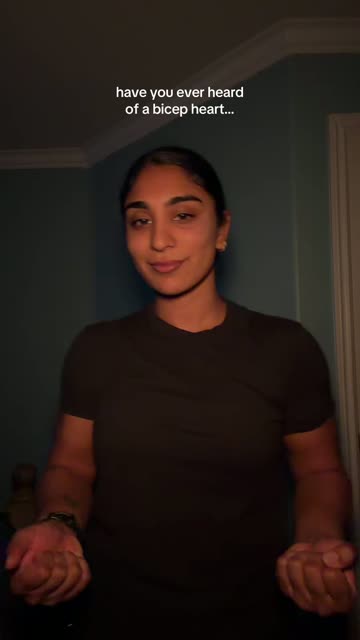
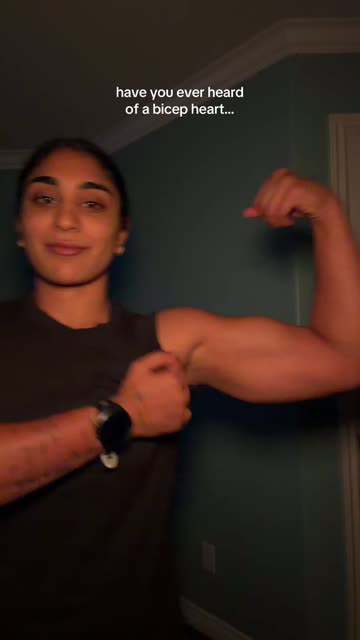
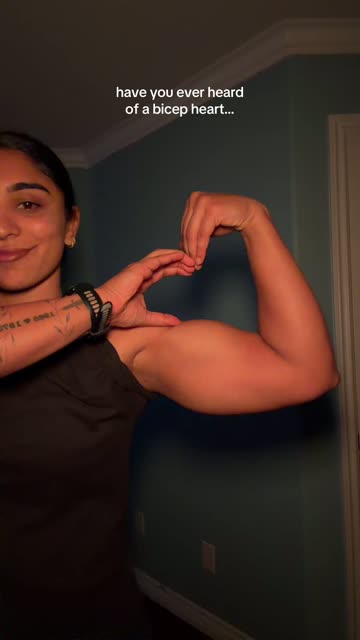
This reference shows the gesture. It is not an output from this generator. AI results can differ in appearance, hands and movement.
02 / FROM A FLEX TO A HEART
Bicep Heart turns a flex into an affectionate gesture. One arm bends upward while the opposite hand curls toward the upper arm, leaving a small heart-shaped space. The fun is in the change: a confident flex becomes something unexpectedly sweet.
You may have seen Bicep Heart clips used as a playful hello, a gym joke or a little message to someone. The pose does most of the talking, so it works with a short caption.
Our Bicep Heart AI video generator creates an animated version from a still image. You do not need to film the gesture, record a routine or write a prompt. The finished scene is AI-generated.
03 / MAKE IT YOURS
One photo is all you need to start.
Use a recent, well-lit picture with your face, shoulders and upper body in view. Keep both arms inside the frame if possible. You can start with your arms relaxed; the prepared Bicep Heart scene supplies the movement.
Sign in with Google, select your settings and check the credit cost beside Generate. Six seconds gives you a short take; fifteen seconds leaves more time for the movement. Buy a pack if your balance needs a top-up.
Open the completed Bicep Heart video and watch it through. Check the face, fingers and final pose, then save the MP4. You can return through My videos using the same account. Download results within seven days of completion.
A close selfie can show your face well but leave little information about your arms. For Bicep Heart, choose a wider crop with some space around your shoulders and elbows.
Face the camera in even light. Keep your hands away from your face and choose a background that makes your outline easy to see. Avoid group pictures, strong beauty filters and sunglasses.
The starting image guides the result without fixing every detail. Clothing, facial features and finger positions may change. A clearer picture helps the model, but it cannot guarantee a perfect match.
05 / SEND A LITTLE AFFECTION
A Bicep Heart video makes a lighthearted reply to a friend or partner. Use your own picture and let the gesture carry the message. A caption as simple as “This one's for you” is enough.
Turn a straightforward fitness post into a Bicep Heart moment. The flex sets up the joke; the little heart delivers it. You do not need a dramatic transformation or a long explanation.
Use a Bicep Heart AI video when you want to try the gesture from a picture you already like. Download the vertical clip, add your own caption, and disclose its AI origin when sharing could otherwise mislead viewers.
06 / KNOW YOUR SETTINGS
Choose the cost and format that suit your idea. All options produce a vertical MP4; actual duration may be slightly shorter than the selected length.
See all credit packs| Length | 480p Standard | 720p HD |
|---|---|---|
| About 7 seconds | 10 credits | 20 credits |
| About 15 seconds | 25 credits | 50 credits |
Credit packs start at $4.99 for 20 credits. That covers one seven-second HD clip or two seven-second standard clips. Packs are paid once, with no subscription or automatic renewal.
Use a larger balance for longer takes, or mix settings as you go. The Bicep Heart AI video generator shows the required credits before you begin.
No. The recognizable part is the shape made by the arm and hand. You can try Bicep Heart with an ordinary picture of yourself; you do not need to prepare a gym pose. Body proportions and the final gesture can vary in the generated result.
You can look through the examples and select an image without using generation credits. Creating a finished clip requires a paid credit balance. The image preview is a preview of your selected file, not a free generated result.
This version is designed for one adult in one picture. Choose an image of yourself or another adult who has agreed to this use. Group pictures and pet images are outside the supported input for this generator.
The original trend soundtrack is not guaranteed. Check your downloaded file before posting. You can add music available for your intended use within TikTok or another editing app; purchasing credits does not provide a license to someone else's music.
Processing time depends on the current workload. Follow the status shown in the creator or My videos. Once your request is accepted, you can leave the page and return later. Check an existing request before starting another.
Credits are reserved when processing begins and spent on confirmed completion. A confirmed failure releases the reserved credits back to your balance. If the status is unclear, contact support with the task ID so the request can be checked.
You can request a refund within seven days for a completely unused pack with no credits reserved by an ongoing task. Different rules apply to technical problems and completed results. See the Refund Policy for the conditions and how to contact support.
This is an independently operated Bicep Heart AI video generator. It is not affiliated with TikTok or the creators of individual trend clips. Generated scenes are creative interpretations, and no particular number of views or reactions is promised.
A LITTLE FLEX. A LITTLE LOVE.
Pick a picture you like. Make the gesture your own. Send a little affection with a flex.
Create my Bicep Heart video